
Download Blockbench – Free 3D Model Editor for Minecraft, Game Development & Animation
Overview of Blockbench
Blockbench is a powerful, free 3D model editor specifically tuned for low‑poly creations. Built on an open‑source GPL license, the tool gives hobbyists, indie developers, and seasoned modders an intuitive environment to design, texture, and animate models that fit perfectly inside the blocky universe of Minecraft. While its core strength lies in the familiar cuboid workflow that mimics the aesthetic of Minecraft Java and Bedrock Editions, Blockbench also extends beyond the sandbox game, supporting formats such as OBJ, FBX, and even custom JSON files for other engines. The application is available on Windows, macOS, Linux, as well as Android and iOS through a web‑based version, making it a truly cross‑platform solution for creators who need a reliable, free tool without sacrificing professional‑grade features. Whether you’re crafting a new entity, designing a custom block, or building a complex animated creature, Blockbench consolidates modeling, texturing, and animation into one seamless workflow, saving you time and allowing you to focus on creativity rather than technical bottlenecks.
Key Features that Set Blockbench Apart
- Cube‑Based Modeling Engine: The core editor uses cuboids to replicate the classic Minecraft look, with full control over size, rotation, and pivot points.
- Advanced Texture Painter: Paint directly on 3D surfaces or switch to a 2D canvas, import PNG textures, and use plugins for external image editors.
- Dedicated Minecraft Export Options: Export block models, entity JSON files, Optifine entities, and Bedrock animation files with a single click.
- Animation & Graph Editor: Create key‑frame animations, fine‑tune motion curves, and export to Minecraft Bedrock, Blender, Maya, or Sketchfab.
- Multi‑Format Support: In addition to Minecraft formats, Blockbench can import and export OBJ, GLTF, FBX, and custom JSON for broader game‑engine compatibility.
- Plugin Ecosystem: Extend functionality with community‑built plugins for extra import/export filters, custom UI themes, and batch processing tools.
- Cross‑Platform Availability: Native desktop apps for Windows, macOS, Linux, plus a responsive web version that runs on Android and iOS devices.
- Open‑Source Community: Continuous updates are driven by a vibrant community, ensuring the software stays free, secure, and up‑to‑date.
Installation, Setup & Everyday Usage
Getting Blockbench Up and Running
Downloading Blockbench is straightforward. Visit the official website, select the installer for your operating system (Windows .exe, macOS .dmg, or Linux .AppImage), and click the Download button. The installer is digitally signed, guaranteeing a secure, malware‑free installation. For mobile or tablet users, navigate to the web version; no additional download is required—just a modern browser that supports WebGL.
Once installed, launch the app and you’ll be greeted by a clean workspace. The first time you open Blockbench, a quick onboarding wizard helps you set default preferences such as texture size, unit measurements (pixels vs. blocks), and the default export folder. You can also link your Minecraft installation directly, enabling one‑click testing of models inside the game.
Typical Workflow for a Minecraft Model
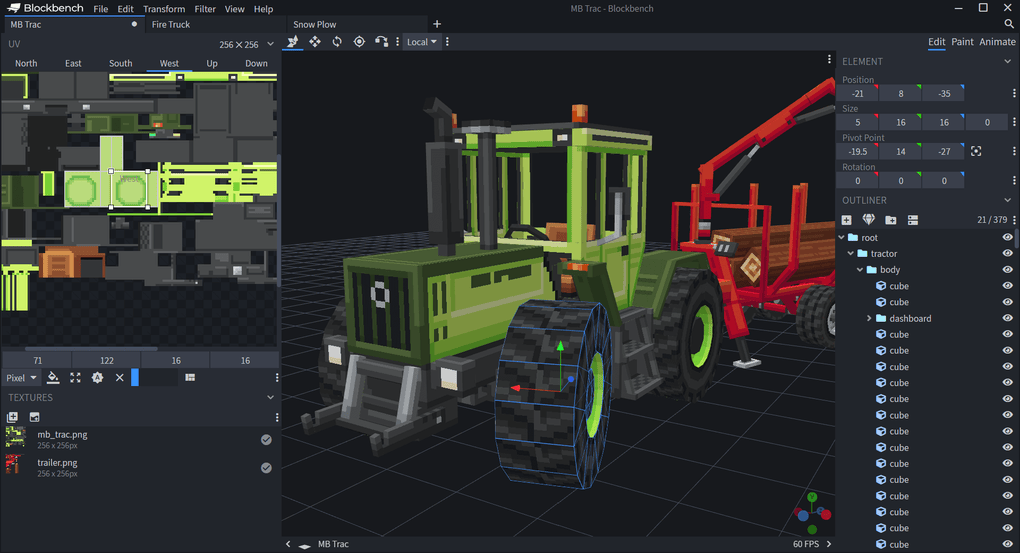
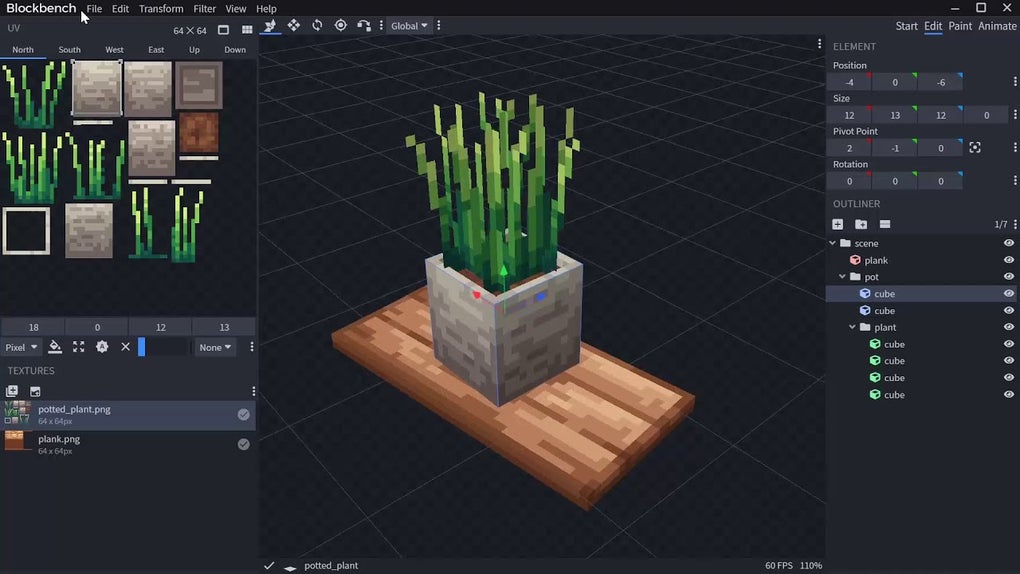
Start by creating a new project and entering a name, parent model (if you’re extending an existing asset), and texture dimensions. The editor’s left panel displays a hierarchy of cubes, while the central viewport shows a real‑time 3D preview. Add cubes using the Add Cube button, then adjust their dimensions, rotation, and pivot points in the properties pane. To texture a cube, open the built‑in 2D editor, paint or import a PNG, and apply it to the selected faces. The live preview instantly reflects changes, so you can iterate quickly.
When your geometry is complete, switch to the Animation tab. Here you can create a timeline, set keyframes for position, rotation, and scale, and use the graph editor to smooth out motion curves. Once satisfied, export the animation as a Bedrock .animation file or as a generic .glb for use in other engines. The export dialog also lets you choose the appropriate Minecraft format, ensuring compatibility with both Java and Bedrock editions.
Tips for Efficient Use
- Use the Duplicate function to create symmetrical parts quickly.
- Leverage the Snap to Grid option for precise alignment of cubes.
- Save incremental versions using File → Save As… to avoid losing work.
- Explore community plugins for batch texture conversion or custom export scripts.
- Regularly check the Updates menu; the open‑source model receives monthly enhancements and bug fixes.
Compatibility, Pros & Cons
Supported Operating Systems
Blockbench runs natively on Windows 10/11, macOS 10.13 or later, and major Linux distributions (Ubuntu, Fedora, Arch). A web‑based version powered by WebGL works on any modern browser, giving you full functionality on Android and iOS devices without the need for a separate download.
Pros
- Free & Open‑Source: No hidden fees, fully transparent source code.
- Specialized Minecraft Tools: Dedicated export formats and one‑click testing.
- All‑In‑One Solution: Modeling, texturing, and animation in a single interface.
- Cross‑Platform: Desktop, web, and mobile access.
- Extensible via Plugins: Community‑driven features keep the app current.
- Low System Requirements: Runs smoothly on modest hardware.
Cons
- Curve Modeling Complexity: Adding non‑cuboid curves is possible but can be unintuitive.
- Limited Outside‑Minecraft Use: While export formats exist, some engines require additional conversion steps.
- Animation Learning Curve: New users may need time to master the timeline and graph editor.
- No Native VR Support: For advanced 3D workflows, you’ll need external tools.
Overall Rating: 4.5/5 – Blockbench delivers a professional-grade experience without a price tag, making it the go‑to free solution for Minecraft creators and low‑poly enthusiasts.
Frequently Asked Questions
Is Blockbench completely free, or are there hidden costs?
Blockbench is 100 % free. The core application, all updates, and the majority of plugins are released under the GPL license. There are no premium tiers or subscription fees, and the official website does not ask for donations to unlock features.
Can I use Blockbench to create models for games other than Minecraft?
Yes. Blockbench supports OBJ, GLTF, FBX, and custom JSON exports, which can be imported into Unity, Unreal Engine, or Blender. However, because the UI is optimized for cuboid workflows, you may need additional tools for high‑poly or organic modeling.
Does Blockbench run on low‑end hardware?
Absolutely. The application is lightweight and only requires a modest GPU that supports WebGL. Even older laptops or netbooks can run the desktop version smoothly for typical low‑poly projects.
How do I export an animated model for Bedrock Edition?
After creating your animation in the Animation tab, click File → Export → Bedrock Animation (.animation). The exported file can be placed in your resource pack’s animations folder and referenced in the entity JSON.
Is there a community or support forum for Blockbench?
Yes. Blockbench maintains an active Discord server, a subreddit, and a GitHub repository where users can ask questions, share plugins, and report bugs. The developers frequently engage with the community to prioritize new features.
Conclusion & Call to Action
Blockbench stands out as the most accessible, feature‑rich, and truly free 3D model editor tailored for Minecraft creators while still offering enough versatility for broader game‑development tasks. Its seamless integration of modeling, texturing, and animation, combined with cross‑platform availability and an active open‑source community, makes it a must‑have tool for anyone looking to bring custom low‑poly assets to life. Whether you are a beginner eager to design your first custom mob or a seasoned modder seeking an efficient workflow, Blockbench delivers the tools you need without any cost barrier.
Ready to start building your own Minecraft worlds? Download Blockbench now and unleash your creativity. The free, secure installer is just a click away, and you’ll be modeling, texturing, and animating in minutes.



.png)



